
Keep what you build with your agent
Little apps you can keep, grow, and hand to a friend
July 24, 2026 · Pupa team
Contents
Start with a conversation
You’re chatting with your agent, and halfway through you realise you need somewhere to see things. Not another wall of text: a place. A few rows you can sort, a calendar, a checklist the two of you keep up to date.
So you ask, and it appears next to the chat. From then on the agent doesn’t just tell you things. It works in that little dashboard with you, adding rows and ticking items while you watch, and you can edit the same screen by hand whenever you like.
That moment, “I need a place for this”, is the whole idea behind Pupa. This post is about what happens when you keep those places, let them grow, and hand them to someone else.
A photo becomes an app
Say you’ve just been handed a prescription. Two medicines, one twice a day with food, the other every second morning. You photograph the label and ask your agent to keep you on schedule.
It reads the schedule off the photo and builds you a small app: a calendar with every dose on it, and a reminder that fires on your phone when it’s time. That’s the entire setup. You took a picture; you got a working app.
We call these little apps MiniApps. They’re built from a handful of plain, well-made parts: a calendar, a tracker, a checklist, a chart, a chat room. An agent doesn’t need a beautiful interface to work with you. It needs a few honest parts it can read and update. So the parts stay simple, and the agent handles them well.
It grows
A week in, you want to keep notes. How you’re feeling, any side effects, whether the medicine seems to help. Ask for a small diary next to the calendar, and have each entry linked to its day.
Now a rough entry in the diary points at the doses it lines up with, and from the calendar you can jump back to what you wrote. Neither piece is clever on its own; the link between them is where the value shows up. And a link is something the agent can make from one sentence.
Everything the app learns lives in its own long-term memory, which we call Memories, along with the items your components use, so it’s all still there next week, and on your other devices too.
Make something just for you
Not everything worth building is practical. One of our favourite MiniApps is a bedtime-story studio for a small child: a cast of characters the child invented, each with a name and a portrait and a temper; a shelf of finished stories; and an agent that writes tonight’s episode with that cast, at the right length for that bedtime. Every new story goes on the shelf. Every new character joins the cast.
Nobody sells an app like that. It’s too particular: one child, one cast, one family’s in-jokes. Which is exactly the point. When an app takes an afternoon of chatting to make, rather than a team of engineers, it becomes worth building things with an audience of one. We think this space is wide open, and it’s where MiniApps feel most like themselves.
It scales when you need it to
The same shape carries real work too. Take a job search. The messy parts (reading company pages, tailoring a CV, drafting cover letters) happen in conversation, on your own computer, with your own files and logins. The parts worth keeping tidy live in the MiniApp: a tracker of where you’ve applied, a calendar of interviews, your experience and the questions you like to ask.
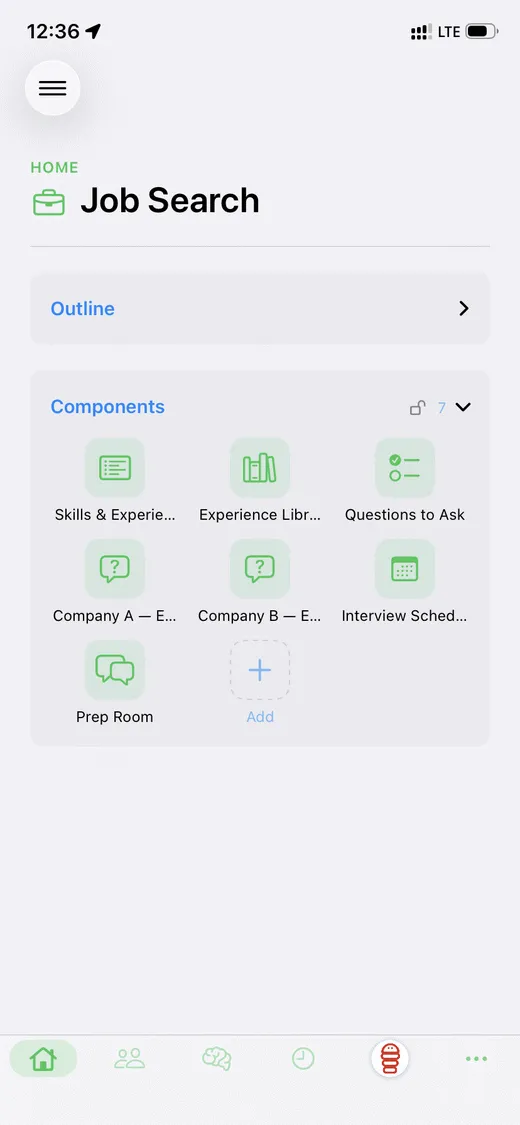
Notice what the app holds and what it doesn’t. Your record and your method stay in the app. Your logins, your private files and your web access belong to whatever computer it runs on, granted fresh each time. Your keys stay home.
Hand it to a friend
A MiniApp travels as a single file, a .pupa. There’s no code inside:
just a description of the app and the memories you chose to include. When a
friend opens it, their own Pupa rebuilds the app from that description and
shows them exactly what’s inside before anything runs.
So sharing your medication tracker, your story studio, or your whole job-search method is one tap on the share sheet. What your friend receives is the shape of what you built and the habits baked into it. Never your data, never your logins.
The parts apps are made of are an open set, too. If the built-ins don’t cover your idea, new kinds can be added and shared the same way. How that works, and how it stays safe, has its own post: Build your own component.
Why this matters more now
Agents are starting to do real work while you’re not watching: checking things overnight, keeping records current, sending the reminder before you knew you needed it. The more they do alone, the more it matters what’s steering them.
With a MiniApp, that steering isn’t scattered across prompts and config files. It’s one thing you can open, read, carry to another machine, and hand to someone you trust. An app you can see is an app you can trust with more.
Where this goes
There’s an early marketplace where MiniApps people have made can be browsed and opened in your own Pupa. The agents will keep talking either way. Pupa is for the moment a conversation turns into something you want to keep.
If you’d rather see the machinery (what the agent actually reads and writes), there’s a technical companion: From a skill on your machine to an app in your pocket.